AI dungeon-master tabletop speaker
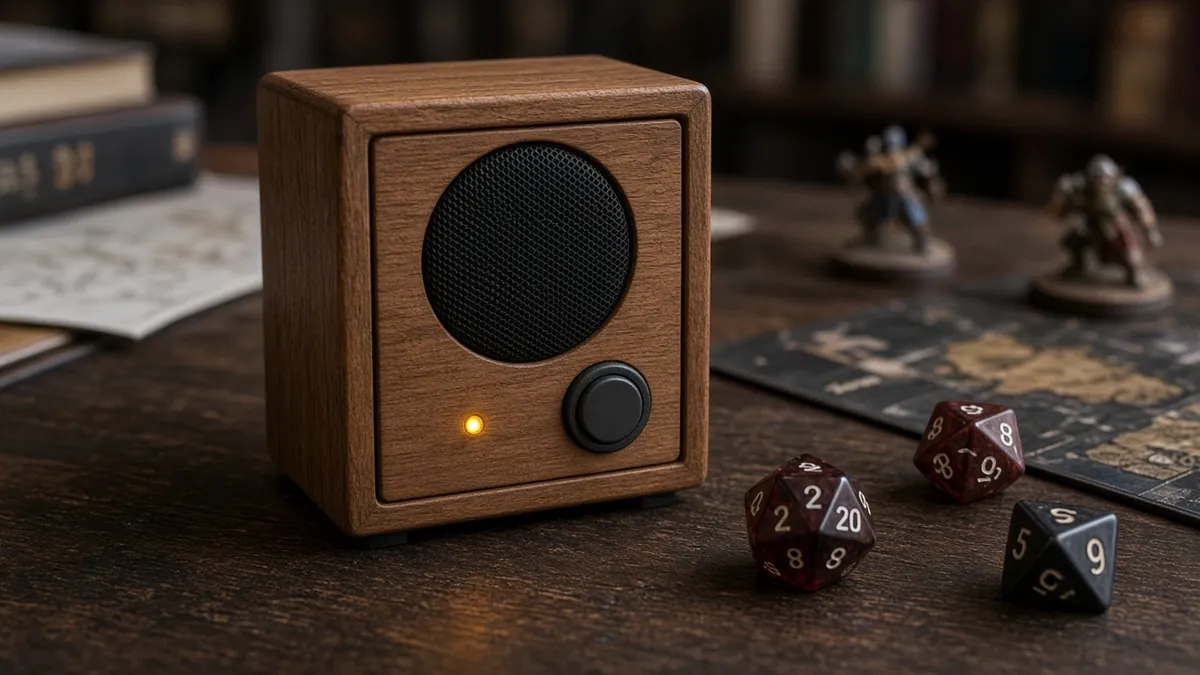
A Raspberry Pi in a tabletop speaker that listens to the table with a microphone, asks a local LLM what happens next, and speaks the result with a local TTS voice. A prop for a game you still run as the human referee.
Safety first
- Use a correctly rated Pi power supply. Start at a low speaker volume.
- This is a low-voltage project. No mains inside the case.
- A push-to-talk button is important so you are not recording the table all night.
Rules and laws
- Tell the players you are recording snippets for the local assistant, and do not upload their audio or campaign notes to a cloud API unless everyone agrees.
- Respect the licenses of any published adventure text you feed the model. Do not paste a whole copyrighted book into a prompt and republish it.
Parts
| Part | Qty | Approx. each | Subtotal |
|---|---|---|---|
| Raspberry Pi 5, 4 GB (SC1111/SC1431)Price seen ~$110.00 on PiShop.us, Nov 12, 2026. Price seen $110.00, in stock, on PiShop.us (a Raspberry Pi approved reseller). Amazon listing B0CK3L9WD3 exists but was not used because reseller pricing was lower and clearer.PiShop.us · price seen on 2026-11-12 | 1 | $110 | $110 |
| USB-C PD 27 W power supply for Raspberry Pi 5, ETL listedPrice seen ~$11.95 on PiShop.us, Nov 12, 2026. Price seen $11.95 as a related item on the PiShop Raspberry Pi 5 page.PiShop.us · price seen on 2026-11-12 | 1 | $11.95 | $11.95 |
| USB microphoneTypical $10-25, no verified link.Amazon (search) | 1 | $15 | $15 |
| Small powered speaker, 3.5 mm or USBTypical $12-30, no verified link.Amazon (search) | 1 | $18 | $18 |
| Momentary push buttonPush-to-talk. Typical $1-6, no verified link.Amazon (search) | 1 | $3 | $3 |
| microSD card, 32 GB or larger, application classTypical $8-15, no verified link this pass.Amazon (search) | 1 | $10 | $10 |
| Estimated total (parts only) | $167.95 | ||
Typical US prices, checked 2026-11-12. Prices change and multi-packs are often cheaper per piece.
As an Amazon Associate I earn from qualifying purchases. Prices change; check the store.
Filament
PLA (1.75 mm): about 100 g (33.6 m), roughly 6 h of printing.
PLA, 0.2 mm layers, 15-20% infill, 2-3 walls, supports if the speaker grille needs them. Leave vents and a clear path to the microphone.
AI agents you'll use
- Game-loop helper (ChatGPT, Claude, Gemini or Grok): Writes a Python loop that records only while a button is held, transcribes with whisper.cpp, asks a local Ollama model to continue a scene, and speaks with Piper, with a short memory file.
- Prompt helper: Helps you write a system prompt that leaves final rulings to the human dungeon master.
Tools
- Computer to flash the Pi
- microSD reader
- Optional 3D printer
- Screwdriver
What you'll learn
- A speech-to-text, LLM, text-to-speech loop on a Raspberry Pi
- Keeping a short campaign memory without uploading the table's audio
- A push-to-talk button so the mic is not always live
- Why a local model will not replace a human dungeon master
This box is a talking prop that suggests a next scene, a rumble of thunder, or a goblin's voice. You, or a human referee, still run the game. A local model will invent things, forget rules, and need a grown-up at the table.
What you'll build
A Raspberry Pi in a printed or wooden case, a speaker, a microphone, and a push-to-talk button. The software is the same family as the local voice assistant project: whisper.cpp, a small local LLM, and Piper. The difference is the prompt and a short campaign memory file on disk.
Print the parts
Search Printables or Thingiverse for a Raspberry Pi speaker case, credit the designer, or use a simple wooden box. Print with the settings above. Give the microphone a clear opening and the Pi some vents.
Wiring
| From | To |
|---|---|
| Official Pi power | Pi USB-C power |
| USB mic or speaker | Pi USB or 3.5 mm, as the hardware requires |
| Push-to-talk button | A GPIO and GND, for example GPIO 17 and GND |
Step-by-step
- Flash official Raspberry Pi OS and test recording, playback, a small Whisper model, a small Ollama (or llama.cpp) model, and Piper, one at a time, as in the local voice assistant project.
- Wire the button and write a script that records only while the button is held.
- Add a system prompt: you are a tabletop narrator, you do not overrule the human referee, you keep answers short, and you do not invent real-world harm.
- Keep a small plain-text memory file (the last few scenes, the party name) and rotate it so it cannot grow forever.
- Put it in the case, turn the volume down, and run a short one-shot with friends who know it is a prototype.
- After the game, delete audio snippets if you do not need them.
Code
Prompt for the helper:
Write a Python script for Raspberry Pi OS that records from the default mic only while GPIO 17 is held, transcribes with whisper.cpp, appends the text to a short local memory file, asks a local Ollama API to narrate the next beat of a tabletop game (short, referee can overrule), and speaks the answer with Piper.
Do not upload audio. Include a volume warning and a way to wipe the memory file. Point me to official READMEs for install flags.
Troubleshooting
- It talks over the players: add a longer pause, a shorter max reply, and a human mute.
- It invents rules: tighten the prompt and have the referee repeat official rulings out loud.
- The Pi is slow: use a smaller model, or run the LLM on a desktop on the same LAN.
- The mic hears the speaker: move them apart, lower volume, and keep push-to-talk.
Files, code and docs
- Raspberry Pi official documentation (Vendor docs)
- whisper.cpp (MIT)
- Ollama (Vendor docs)
- Piper TTS (OHF-Voice/piper1-gpl, successor to the archived rhasspy/piper) (GPL-3.0)
Last checked 2026-11-12. Double-check parts against your own board and seller listings before you buy.