Air-hockey robot opponent
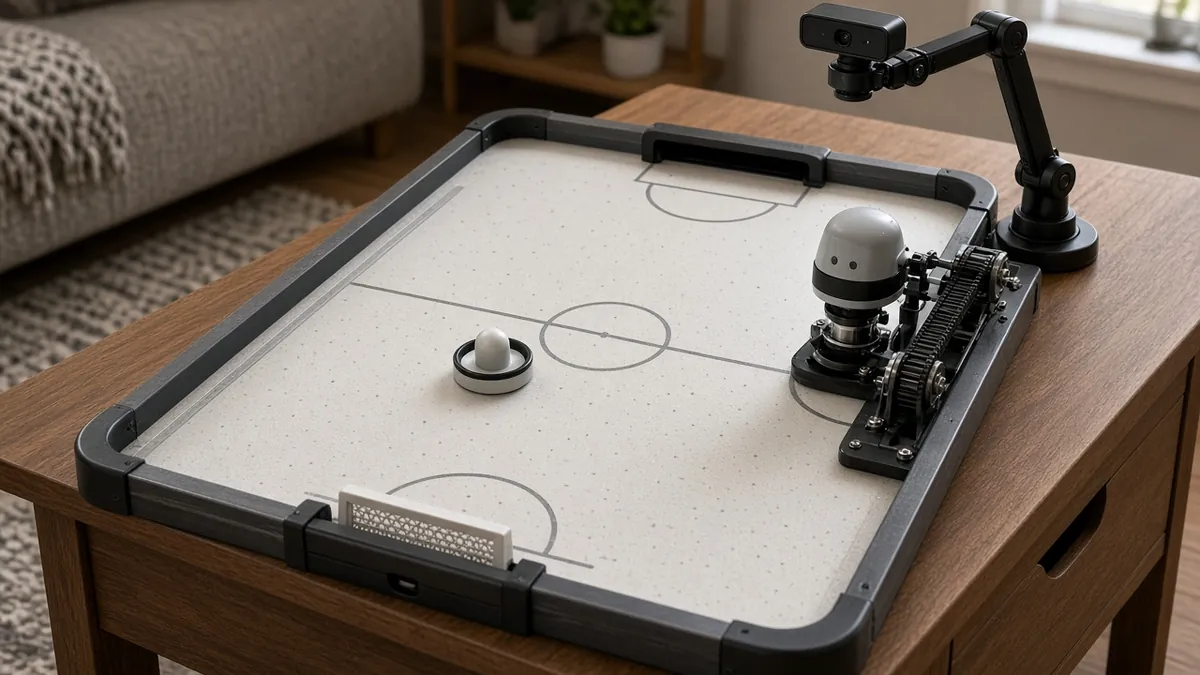
A camera watches a tabletop air-hockey puck, and a fast belt-driven striker tries to block and return it. An advanced vision-and-motion project with real pinch and impact hazards.
Safety first
- This robot can hit hard and pinch. Fit mechanical end-stops, a well-marked emergency-stop that cuts motor power, and physical guards. First tests at very low speed, with safety glasses, and with no one leaning over the table.
- Never put your hand in the striker path 'just to hold the puck'. Unpower the motors first.
- Use a listed supply and keep mains bricks off the play surface. No mains wiring inside the table.
- Stop immediately if a belt, pulley, or magnet comes loose. A flying striker or puck can injure an eye.
Rules and laws
- This is a home-built robot, not an arcade machine you can drop in a public venue without inspection and insurance.
Parts
| Part | Qty | Approx. each | Subtotal |
|---|---|---|---|
| Small tabletop air-hockey surface, or a table you already haveIf you already have a table, your added cost is the robot and camera. Typical $40-120, no verified link.Amazon (search) | 1 | $80 | $80 |
| USB webcam with a 60 fps modePlugs into a computer you already have, which runs OpenCV. Mount it overhead and turn off auto-exposure. Typical $25-60, no verified link.Amazon (search) | 1 | $35 | $35 |
| Fast guarded single-axis or XY striker: belts, motor, rails, controllerStart slow. A GRBL-class stepper may be too slow for a fierce opponent. Typical $60-130, no verified link.Amazon (search) | 1 | $90 | $90 |
| Listed motion-system PSU, end-stops, and a hardware e-stop that cuts motor powerTypical $20-40, no verified link.Amazon (search) | 1 | $25 | $25 |
| High-contrast puck and a rounded striker faceTypical $5-15, no verified link.Amazon (search) | 1 | $8 | $8 |
| Estimated total (parts only) | $238 | ||
Typical US prices, checked 2026-11-12. Prices change and multi-packs are often cheaper per piece.
As an Amazon Associate I earn from qualifying purchases. Prices change; check the store.
Filament
PLA (1.75 mm): about 220 g (73.8 m), roughly 14 h of printing.
PLA or PETG for the striker, camera mount and end-stop guards, 0.2 mm layers, 30% infill and 4 walls on the striker, supports as needed. PETG or a bought mallet face will survive hits better than a skinny PLA blade.
AI agents you'll use
- Vision and control helper (ChatGPT, Claude, Gemini or Grok): Helps you write an OpenCV tracker for a colored puck and a conservative motion command, and refuses to skip end-stops, an e-stop, or a low-speed first test.
- Safety helper: Reviews guards, e-stop placement, and why hands do not go on the table when the robot is armed.
Tools
- 3D printer
- Saw and drill if you build the table from wood
- Soldering iron
- Computer for OpenCV and the motion controller
- Calipers
- Safety glasses for first high-speed tests
What you'll learn
- Tracking a high-contrast puck with official OpenCV on a computer
- Driving a fast single-axis or XY striker with a documented motion controller
- Latency: why a slow camera loop misses the puck
- Guarding a mechanism that moves quickly in front of people
A robot opponent has to see the puck and move a mallet in a thin slice of time. You will get a lot of value out of a slow, clearly tracked puck on a small table before you ever try a full-speed game. Official OpenCV does the seeing; a guarded gantry does the hitting.
What you'll build
An overhead camera, a computer running a color or contrast tracker, and a single-axis (easier) or XY striker at one end of a small air-hockey surface. A first "win" is blocking a slow, straight shot. Returning a fast angled shot is a later goal.
The $120-280 range assumes a small table or a table you already have. A large commercial table and a high-performance servo drive can exceed it.
Print the parts
Print a camera mount that looks straight down, a striker, and guards that keep fingers off the belts. Search Printables or Thingiverse for "air hockey robot" parts if you find an open-licensed design, and credit the designer. If you do not, keep the mechanics simple and original.
The 220 g / 14 h figures are planning estimates for the robot, not for a whole table.
Wiring
| Function | Typical connection | Notes | |---|---| | Camera | USB to the computer, or a Pi camera ribbon | Mount it rigidly. Auto-exposure will ruin tracking if you leave it on. | | Motion controller | USB or a documented serial path from the same computer | Start at a low maximum speed and acceleration. | | Motors and end-stops | As the controller docs describe | End-stops must work before you raise the speed. | | E-stop | Cuts motor power, not only a software flag | Test it. | | Table fan / air supply | The table's own listed supply, separate from the robot if possible | |
Step-by-step
- Fix the camera overhead, light the table evenly, and write an OpenCV script that tracks a brightly colored puck and draws its position, with the motors unpowered.
- Build or fit a slow, guarded single-axis striker. Jog it by keyboard between the two posts.
- Map camera X (and Y, if you need it) to striker position with a ruler, and add software limits inside the mechanical stops.
- Wire a hardware e-stop and test it by pressing it during a slow jog.
- Close a slow loop: the striker tracks the puck's predicted arrival, at a jogging speed, with a friend feeding gentle straight shots.
- Raise speed in small steps only while the track is stable and the guards stay on.
- Add a return-shot later, still with eye protection and no spectators leaning in.
Code
Prompt for the helper:
Help me write a Python + OpenCV script that tracks a brightly colored puck on a uniformly lit table from an overhead camera, predicts a simple straight-line arrival at the goal line, and sends conservative position commands to a motion controller I will describe.
Assume a hardware e-stop exists. Start with a low maximum speed, log latency, and do not tell me to disable end-stops. Point me to official OpenCV docs for color tracking or contour basics. This is a dangerous mechanism if it runs fast.
Get a reliable video track before you close the motor loop.
Troubleshooting
- The tracker jumps to a reflection or a hand: tighten the color range, improve lighting, and wear a dark sleeve during tests.
- The striker is always late: the camera loop is slow, or the motion accel is too low, or you are running too much code in Python on one core. Measure frames per second.
- It slams the end: software limits arrived after the fact, or an end-stop is not wired. Lower speed until that is fixed.
- The puck flies off the table: too much speed, or a sharp striker face. Slow down and round the face.
Files, code and docs
- OpenCV project (Apache-2.0)
- Raspberry Pi Camera documentation (if you use a Pi camera) (Vendor docs)
Last checked 2026-11-12. Double-check parts against your own board and seller listings before you buy.