Two-player bartop arcade cabinet with a Raspberry Pi 5
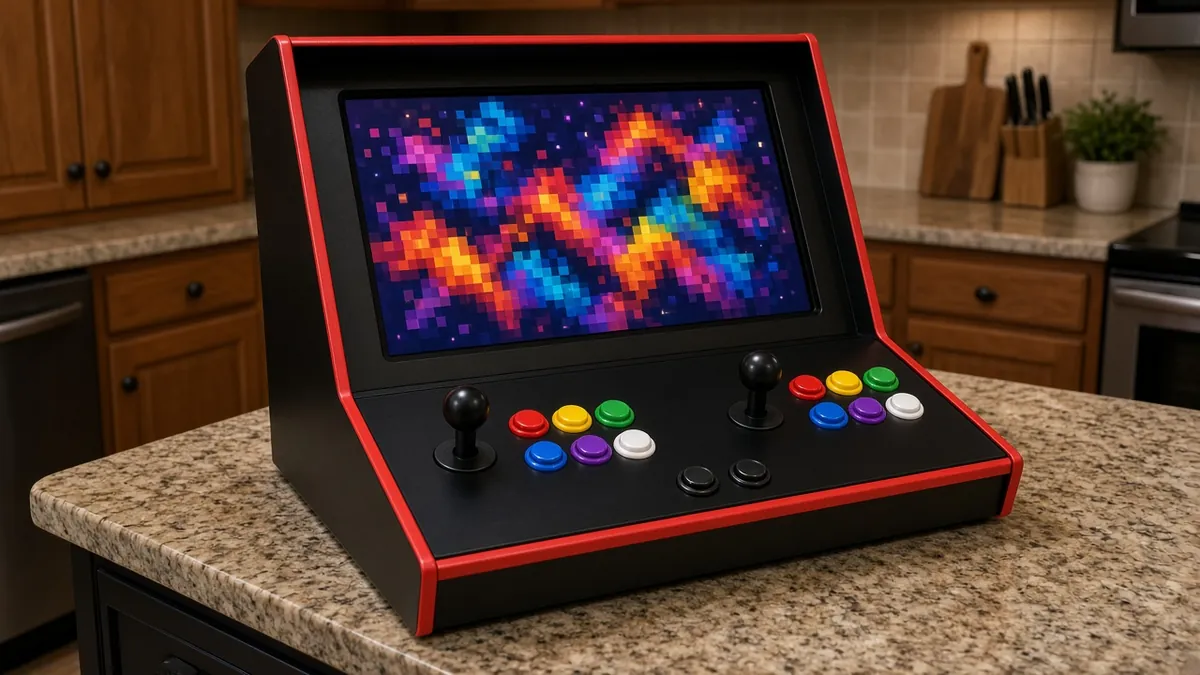
A countertop arcade cabinet cut from MDF with a 19-inch screen, two joysticks and lit buttons wired through USB encoders, and a Raspberry Pi 5 running the Batocera retro-gaming system. Play homebrew and games you legally own.
Safety first
- Wear a dust mask when cutting MDF and work outside or with dust extraction; MDF dust is a respiratory irritant.
- Keep mains wiring to listed, unmodified plug-in devices: a listed power strip feeds the monitor, Pi supply and speakers. Do not splice mains wires.
- Clamp work when drilling the button holes; spade bits grab.
- Leave vent holes so the Pi and monitor do not overheat.
Rules and laws
- Only play games you have the right to use: homebrew, freely licensed games, or copies you made from games you own where your law allows. Downloading copyrighted ROMs you do not own is illegal in many countries.
Parts
| Part | Qty | Approx. each | Subtotal |
|---|---|---|---|
| Raspberry Pi 5 4GBPrice seen $110.00 at PiShop.us (Nov 12, 2026). Typical $105-120.PiShop.us | 1 | $110 | $110 |
| Raspberry Pi 27W USB-C power supplyOfficial supply; Pi 5 needs 5 V 5 A for full USB power. Typical $11-15, no verified link.Amazon (search) | 1 | $11.95 | $11.95 |
| Raspberry Pi 5 Active CoolerTypical $5-10, no verified link.Amazon (search) | 1 | $6 | $6 |
| SanDisk Ultra 128GB microSD cardTypical $13-22, no verified link.Amazon (search) | 1 | $16 | $16 |
| EG STARTS 2-player arcade kit with zero-delay USB encoders2 joysticks, 20 buttons and two USB encoders. Typical $30-55, no verified link.Amazon (search) | 1 | $40 | $40 |
| Acer 19.5-inch HDMI monitorSkip if you already own one. Any HDMI monitor around 19 inches fits a typical bartop; a spare one works. Typical $70-110, no verified link.Amazon (search) | 1 | $85 | $85 |
| Micro-HDMI to HDMI cableTypical $6-11, no verified link.Amazon (search) | 1 | $8 | $8 |
| USB-powered computer speakersTypical $10-20, no verified link.Amazon (search) | 1 | $15 | $15 |
| Sabrent USB external stereo sound adapterThe Pi 5 has no 3.5 mm audio jack; skip this if your monitor has a headphone output. Typical $6-11, no verified link.Amazon (search) | 1 | $8 | $8 |
| MDF project panel 3/4 inch, 2 x 4 ftHome-improvement stores often sell full sheets cheaper and will rip them. Typical $22-40, no verified link.Amazon (search) | 2 | $30 | $60 |
| 3/4-inch T-molding, 20 ftTypical $11-20, no verified link.Amazon (search) | 1 | $15 | $15 |
| 3-outlet surge protector power strip (listed)Typical $9-16, no verified link.Amazon (search) | 1 | $12 | $12 |
| Wood screws and corner brackets kitTypical $10-20, no verified link.Amazon (search) | 1 | $15 | $15 |
| Estimated total (parts only) | $401.95 | ||
Typical US prices, checked 2026-11-12. Prices change and multi-packs are often cheaper per piece.
As an Amazon Associate I earn from qualifying purchases. Prices change; check the store.
Filament
PLA (1.75 mm): about 80 g (26.8 m), roughly 5 h of printing.
PLA, 0.2 mm layers, 20% infill; for the monitor clips, cable clips and speaker grilles.
AI agents you'll use
- Code helper (ChatGPT, Claude, Gemini or Grok): Helps you configure Batocera: controller mapping for the two USB encoders, display settings and scraping box art for games you own.
- Cabinet planner: Turns a bartop design into a cut list for your monitor size, and checks the control panel layout fits two people side by side.
- Legal games scout: Finds free and legally downloadable homebrew games and tells you how to dump your own cartridges or buy legal re-releases.
Tools
- Circular saw or jigsaw
- Drill with 28 mm and 24 mm Forstner or spade bits
- Router with a slot cutter for T-molding (optional)
- Clamps, wood glue and screws
- Sandpaper and paint or vinyl
- Dust mask and safety glasses
What you'll learn
- Cabinet design and woodworking
- USB encoders and arcade control layouts
- Installing and configuring Batocera
- Legal sources of games
An arcade cabinet that fits on a kitchen counter and plays decades of games. It is a big but very rewarding build that mixes woodworking, wiring and software.
What you'll build
A bartop cabinet about 50 cm wide, built from 3/4-inch MDF with T-molding edges. A 19-inch monitor sits behind a bezel; the control panel has two joysticks with six action buttons each, plus start and coin buttons for each player (16 of the kit's 20 buttons). Each player's controls go to a zero-delay USB encoder plugged into the Pi 5, which runs Batocera from the SD card. USB speakers and a listed power strip complete it.
The cost range is $285-445. The low end assumes you already own these items marked "skip if you already own one": Acer 19.5-inch HDMI monitor. The high end includes them.
Print the parts
Print monitor clips, cable clips, speaker grilles and button-label rings. Search Printables for "bartop" parts, and credit the designers.
Wiring
| Item | Connects to | Notes |
|---|---|---|
| Joystick and buttons (player 1) | USB encoder 1 | Follow the kit diagram; each button has its own lead. |
| Joystick and buttons (player 2) | USB encoder 2 | |
| Both encoders | Pi 5 USB ports | |
| Monitor | Pi 5 micro-HDMI 0 | Micro-HDMI to HDMI cable. |
| USB speakers | Pi USB for power; 3.5 mm audio into the USB sound adapter (or the monitor's headphone out) | Pi 5 has no 3.5 mm jack. |
| Power strip | Monitor, Pi supply, speaker power | Listed strip with a switch, mounted inside the back door. |
Step-by-step
- Pick a bartop plan sized for your monitor and print a cut list with the planner.
- Cut and drill the panels; test-fit before glue.
- Assemble the cabinet, add T-molding, paint or wrap it.
- Mount the controls and wire them to the two encoders.
- Flash Batocera to the SD card and boot the Pi 5 with the monitor connected.
- Map both controllers in Batocera and add legal games.
- Close up with vents and the power strip, and play.
Code
No code: Batocera is a ready-made system configured from its menus.
Prompt for the code helper:
I am setting up Batocera on a Raspberry Pi 5 in a bartop with two zero-delay USB encoders (one per player) and USB speakers powered from the Pi with audio through a USB audio adapter.
Using the current Batocera wiki, walk me through: confirming Pi 5 support for my version, mapping both encoders so player order stays fixed, selecting the audio output, and adding homebrew games over the network share.
Troubleshooting
- Players swap after reboot: Encoders enumerate in a different order. Use Batocera's controller order setting.
- No sound: The Pi 5 has no analog jack; select the HDMI or USB audio output in Batocera.
- Joystick directions wrong: The joystick gate or harness is rotated. Turn the joystick or fix the mapping.
Files, code and docs
- Batocera Linux (Vendor docs)
- Batocera wiki (supported systems and Pi 5 notes) (Vendor docs)
- RetroArch (emulation front end used by Batocera) (GPL-3.0)
Last checked 2026-11-12. Double-check parts against your own board and seller listings before you buy.