Bird-ID feeder camera with Frigate
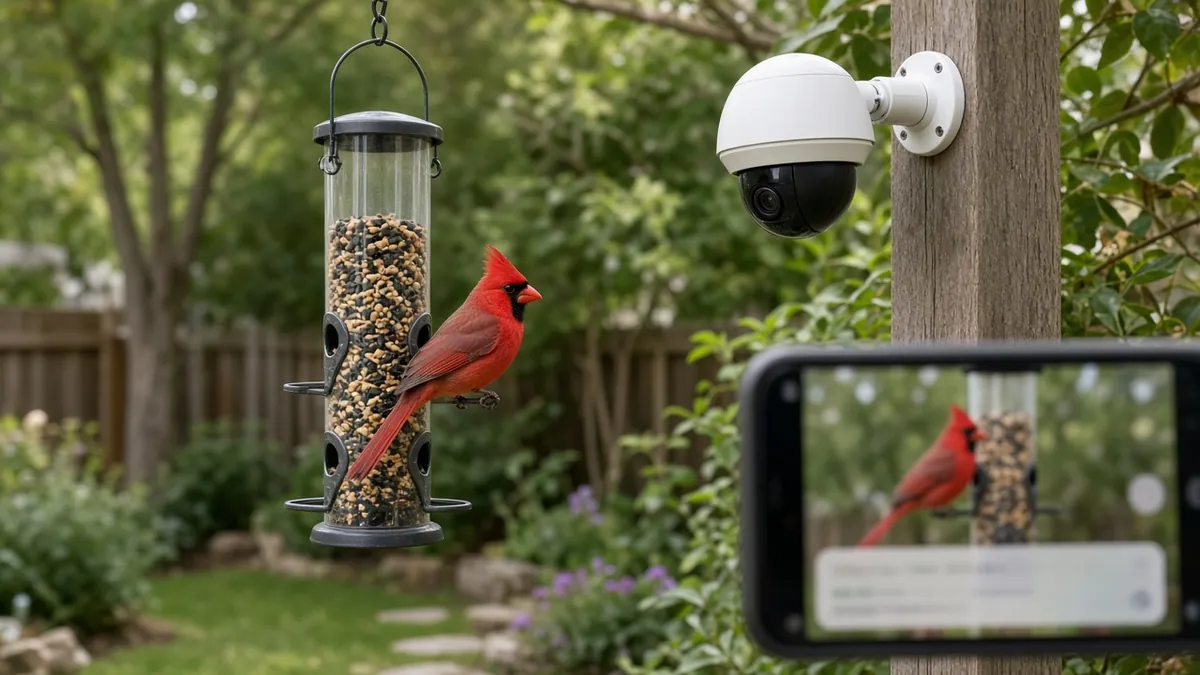
A zoom-and-autofocus Wi-Fi camera watches your bird feeder, Frigate on a computer you own detects birds, and Frigate's built-in bird classification names the species. Home Assistant can send you a snapshot when a new visitor shows up.
Safety first
- Use a ladder only with a helper, and keep cords and plugs out of standing water. Use a GFCI-protected outdoor outlet.
- Clean feeders regularly to avoid spreading bird disease, and follow local wildlife-agency advice about pausing feeding during outbreaks.
Rules and laws
- Point the camera at your feeder, not at neighbors' windows or yards. Turn off audio recording unless you are sure it is legal where you live.
- Some places restrict feeding wildlife (for example, in bear country). Check local rules.
Parts
| Part | Qty | Approx. each | Subtotal |
|---|---|---|---|
| Reolink E1 Outdoor Wi-Fi cameraA compact pan-tilt dome camera. Optical zoom and autofocus help a lot at feeder distances; it provides an RTSP stream Frigate can read. Comes with a power adapter. Typical $70-110, no verified link.Amazon (search) | 1 | $80 | $80 |
| Always-on mini PC (Intel N100 class)Skip if you already own one. Runs Frigate. Skip if you already have a home server. Typical $100-200, no verified link.Amazon (search) | 1 | $140 | $140 |
| Hanging tube bird feederTypical $15-35, no verified link.Amazon (search) | 1 | $22 | $22 |
| Outdoor extension cord, 25 ft (listed)Skip if you already own one. Skip if an outdoor GFCI outlet is close enough. Typical $12-25, no verified link.Amazon (search) | 1 | $18 | $18 |
| Black oil sunflower seed, 10 lbTypical $10-20, no verified link.Amazon (search) | 1 | $15 | $15 |
| Estimated total (parts only) | $275 | ||
Typical US prices, checked 2026-11-12. Prices change and multi-packs are often cheaper per piece.
As an Amazon Associate I earn from qualifying purchases. Prices change; check the store.
Filament
PETG (1.75 mm): about 60 g (19.8 m), roughly 4 h of printing.
PETG, 0.2 mm layers, 25% infill, 4 walls for an outdoor camera bracket or rain hood.
AI agents you'll use
- Code helper (ChatGPT, Claude, Gemini or Grok): Writes a minimal Frigate config from the official docs: one camera, bird as a tracked object, bird classification enabled, and MQTT to Home Assistant.
- Bird ID checker: Double-checks species labels against a field guide or Merlin, and explains which look-alike birds the model may confuse.
Tools
- Computer or mini PC that can run Docker
- Drill and outdoor screws
- Phone for camera setup
- Ladder (with a helper)
What you'll learn
- Running Frigate with an RTSP camera
- Object detection vs species classification
- Camera placement, focus and lighting for small subjects
- Building a bird log in Home Assistant
Find out who really visits your feeder, including the shy ones that only come at dawn. Frigate spots each bird and names the species, and you get a growing photo log without watching the yard all day.
What you'll build
A feeder about 1-2 m from a Reolink E1 Outdoor, a small pan-tilt dome camera with a rounded head on a short wall or post mount, zoomed in so a bird fills a good part of the frame. Frigate runs on an always-on computer with Docker, detects birds, and its bird classification model labels the species. Snapshots and labels go to Home Assistant over MQTT, where you can send a phone notification for new species or build a daily list.
The cost range is $105-305. The low end assumes you already own these items marked "skip if you already own one": Always-on mini PC (Intel N100 class), Outdoor extension cord, 25 ft (listed). The high end includes them.
Print the parts
Print a small bracket or rain hood for the camera if you need one. Search Printables for a hood that fits the E1 Outdoor and credit the designer. Never cover the lens.
Wiring
| Item | Connects to | Notes |
|---|---|---|
| Reolink E1 Outdoor | Its own power adapter and your Wi-Fi | Check Wi-Fi signal at the feeder before mounting. |
| Frigate host | Your home network, preferably wired | |
| Home Assistant | Frigate via MQTT or the Frigate integration |
Step-by-step
- Set up the camera in the Reolink app, enable RTSP, and check the stream in a desktop player.
- Mount the feeder and camera about 1-2 m apart; zoom and focus on the perch.
- Install Frigate with Docker per the official docs and add the camera.
- Track the "bird" object and enable bird classification as the current docs describe.
- Connect Frigate to Home Assistant and set up a notification with the snapshot and species label.
- Check labels against a field guide for the first week and note which species get confused.
Code
No firmware: Frigate and Home Assistant are configured in YAML and their UIs.
Prompt for the code helper:
Help me write a minimal Frigate config for one Reolink E1 Outdoor RTSP camera pointed at a bird feeder, tracking only the "bird" object, with bird classification enabled and MQTT to Home Assistant.
Use only keys from the current docs.frigate.video pages (including configuration/bird_classification) and tell me which values to tune (detect size, min area, thresholds).
Troubleshooting
- Birds not detected: They are too small in the frame. Zoom in or move the camera closer.
- Wrong species: Lighting or angle. Check against a field guide; the model only knows certain species.
- Camera drops offline: Weak Wi-Fi at the feeder. Add a mesh node or use a PoE camera.
Files, code and docs
- Frigate on GitHub (blakeblackshear) (MIT)
- Frigate bird classification docs (Vendor docs)
- Home Assistant (Vendor docs)
Last checked 2026-11-12. Double-check parts against your own board and seller listings before you buy.