Self-driving RC car with Donkey Car
Turn a WLtoys 144010 1/14 RC car into a self-driving racer: a Raspberry Pi 5 with a wide-angle camera records you driving laps, trains a neural network, then drives the track by itself using the open-source Donkey Car software.
Safety first
- The 144010 is brushless and fast enough to hurt shins and break things. Set a low throttle limit, and drive in a closed space without pets or small children.
- Unplug the car battery before working on the electronics; the motor can spin unexpectedly during calibration. Wheels off the ground while calibrating.
- Charge the car's LiPo with a proper charger in a fire-safe bag, never unattended.
Rules and laws
- Do not drive on public roads or sidewalks. Use a private space, a rented hall or an event track.
Parts
| Part | Qty | Approx. each | Subtotal |
|---|---|---|---|
| WLtoys 144010 1/14 4WD brushless RC carThe car the Donkey Car docs call the easiest to get. Comes with its own radio and battery. It is fast: start with a low throttle limit. Typical $100-160, no verified link.Amazon (search) | 1 | $120 | $120 |
| Raspberry Pi 5 4GBDonkey Car docs ask for a Pi 4 or 5 with 4 GB. Price seen $110.00 at PiShop.us (Nov 12, 2026). Typical $105-120.PiShop.us | 1 | $110 | $110 |
| Raspberry Pi Camera Module 3 WideTypical $33-42, no verified link.Amazon (search) | 1 | $35 | $35 |
| Raspberry Pi 5 camera cable 200 mmPi 5 uses the smaller 22-pin camera connector. Typical $2-5, no verified link.Amazon (search) | 1 | $3 | $3 |
| Raspberry Pi 5 Active CoolerTypical $5-10, no verified link.Amazon (search) | 1 | $6 | $6 |
| HiLetgo PCA9685 16-channel servo driverDrives the car's steering servo and ESC. Price seen $8.99 in our parts catalog (Nov 12, 2026). Typical $7-12.Amazon | 1 | $8.99 | $8.99 |
| Anker PowerCore 10000 USB power bankPowers the Pi separately from the car battery. Typical $18-28, no verified link.Amazon (search) | 1 | $22 | $22 |
| SanDisk Ultra 128GB microSD cardTypical $13-22, no verified link.Amazon (search) | 1 | $16 | $16 |
| Zeee LiPo safe bagFor charging the car's LiPo with its included charger. Typical $9-16, no verified link.Amazon (search) | 1 | $12 | $12 |
| M2 and M3 screw assortment kitTypical $9-16, no verified link.Amazon (search) | 1 | $12 | $12 |
| 40-pin 20 cm female-to-female jumper wiresCatalog ASIN. Typical $4-8.Amazon | 1 | $5.50 | $5.50 |
| Estimated total (parts only) | $350.49 | ||
Typical US prices, checked 2026-11-12. Prices change and multi-packs are often cheaper per piece.
As an Amazon Associate I earn from qualifying purchases. Prices change; check the store.
Filament
PLA (1.75 mm): about 200 g (67.1 m), roughly 12 h of printing.
PLA, 0.2 mm layers, 20% infill, no supports; the Donkey roll cage prints upside down as its docs describe.
AI agents you'll use
- Code helper (ChatGPT, Claude, Gemini or Grok): Walks you through the official Donkey Car install, the myconfig.py settings for PCA9685 steering and throttle, and reads your error logs.
- Data coach: Looks at your tub (driving data) stats and suggests what laps to add or delete before training.
Tools
- Small hex and Phillips drivers
- Computer to flash the SD card and optionally train models
- Masking tape to mark a track
- USB-C cable
What you'll learn
- Behavior cloning: learning to drive from your own laps
- Collecting and cleaning training data
- Training and deploying a small neural network
- Controlling a steering servo and ESC from a PCA9685
Drive ten laps, press train, and watch the car drive the track by itself. Donkey Car is a well-known open-source self-driving platform and a hands-on way to learn machine learning.
What you'll build
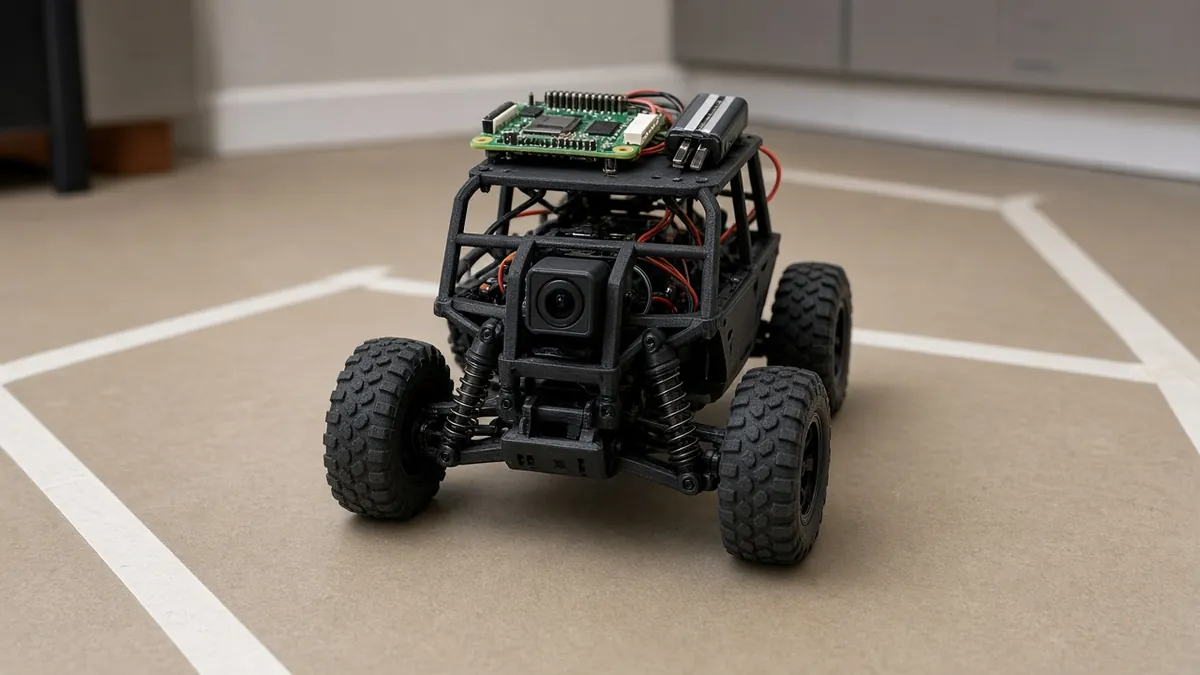
A WLtoys 144010 with printed Donkey adapters, top plate and roll cage. The Pi 5 records camera frames plus your steering and throttle while you drive it from a phone or gamepad, trains a small neural network (on the Pi, on your computer or in the cloud), and then drives in autopilot mode.
The cost range is $315-390 for the parts listed below, allowing about 10% either way for price swings.
Print the parts
Download the official classic Donkey Car files from aconway on Thingiverse (thing 2260575: Magnet_Roll_Cage_v3.stl and Magnet_Plate_v9.stl). That listing is CC BY-NC — credit the author, and do not host or redistribute the files on this site. Get the WLtoys 144010 adapters from Thingiverse 2566276 (CC BY — credit the designer; confirmed on the 3dgo.app Thingiverse mirror, Nov 12, 2026). Re-check the live badge before you print. The official build guide is at docs.donkeycar.com/guide/build_hardware/. The roll cage prints upside down without supports.
Wiring
| From | To | Notes |
|---|---|---|
| Car steering servo lead | PCA9685 channel 1 | Unplug it from the car receiver. |
| Car ESC lead | PCA9685 channel 0 | The ESC powers the PCA9685 servo rail; do not also connect a 5 V supply to V+. |
| PCA9685 VCC / GND / SDA / SCL | Pi 3V3 / GND / GPIO2 / GPIO3 | I2C, address 0x40. |
| Camera Module 3 Wide | Pi 5 CAM port | With the 22-pin to 15-pin cable. |
| Power bank | Pi 5 USB-C | Separate from the car battery. |
Channel numbers follow common Donkey defaults; set the real ones in myconfig.py during calibration.
Step-by-step
- Print the plate, cage and adapters, and fit them to the car.
- Flash Raspberry Pi OS 64-bit with Raspberry Pi Imager, then follow the Donkey Car docs for your Donkey version (the current docs pair Donkey 5.x with a matching Pi OS release).
- Create the car app and wire the PCA9685 to the steering servo and ESC.
- Calibrate steering and throttle with the wheels off the ground, and set a low max throttle.
- Tape a track and drive 10-20 clean laps from the web UI or a gamepad.
- Delete bad sections of data, then train a model.
- Run in autopilot at low speed, add more laps where it fails, and retrain.
Code
Official Donkey Car Python software; no custom firmware. Configuration lives in myconfig.py.
Prompt for the code helper:
I am setting up Donkey Car on a Raspberry Pi 5 (Raspberry Pi OS 64-bit) with a PCA9685 at 0x40, steering on channel 1 and throttle on channel 0, and a Camera Module 3 Wide.
Using only the current docs.donkeycar.com instructions, list the install steps for the matching Donkey version and the myconfig.py lines to change.
Then help me read this calibration output: <paste>.
Troubleshooting
- Car lunges at startup: Throttle neutral is wrong. Recalibrate with wheels off the ground.
- Autopilot drifts wide on corners: Not enough corner data. Drive more careful laps through that section.
- Camera not found: Use the 22-pin Pi 5 cable, seated the right way round, and check the camera docs.
Print files
- Donkey Car classic print files (aconway, CC BY-NC. We don't host this file.)
- Donkey Car 144010 adapters (the designer, CC BY. We don't host this file.)
Files, code and docs
- Donkey Car software (autorope/donkeycar) (MIT)
- Donkey Car documentation (Vendor docs)
- Donkey Car classic print files (aconway, Thingiverse 2260575) (CC BY-NC — link only, do not host or redistribute)
- Donkey Car 144010 adapters (Thingiverse 2566276) (CC BY — credit the designer (confirmed on the 3dgo.app Thingiverse mirror, Nov 12, 2026; the live Thingiverse page itself failed to fetch))
- Raspberry Pi camera documentation (Vendor docs)
Last checked 2026-11-12. Double-check parts against your own board and seller listings before you buy.